 Libre Aquatics Wiki
Colorado Time Systems Gen7 Legacy Timer
From Libre Aquatics Wiki, the free aquatics reference
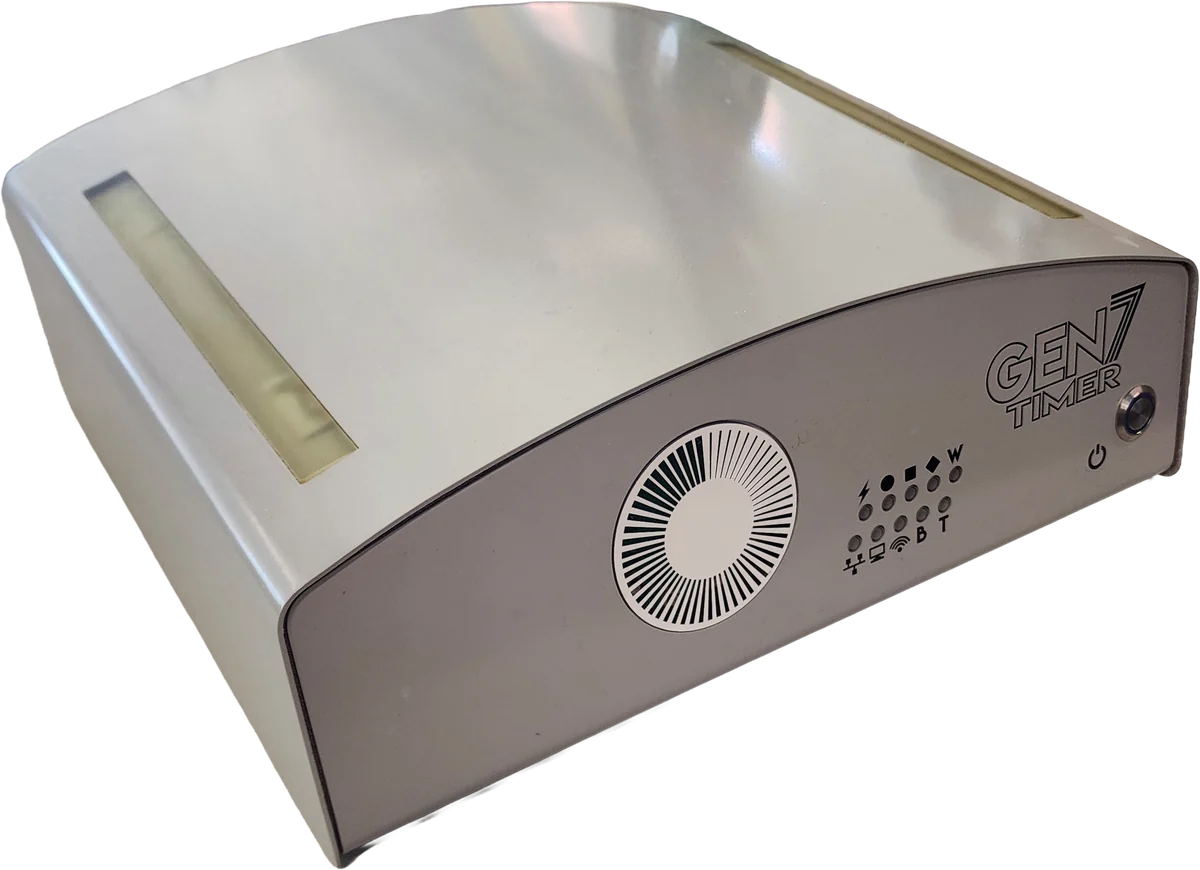
The Gen7 Legacy Timer (part number GEN7-TMR-L) is a swimming timing console made by
Colorado Time Systems (CTS). It
is one of the two consoles in the company’s Gen7 swim-timing platform: it collects the
finish signals from each lane’s touchpad and backup pushbuttons, runs the race clock,
and drives the scoreboard, and it is operated from a Windows laptop or tablet connected
over Ethernet rather than from a built-in keypad.12 The Legacy console
cables to the deck through a facility’s existing CTS lane hardware and display boards,
so it can replace an older CTS console without rewiring the pool.13
Role in the timing system
The Legacy timer occupies the same place in a timing system as the Gen7 Serial Timer: it is the head end that the deck equipment connects back to. Each lane’s touchpad, pushbuttons, and relay-judging platform run through deckplates or cable harnesses to the timer; the starter’s console and speaker also connect to it. The timer measures the elapsed time for every lane and sends results to the scoreboard. A separate computer running CTS’s Gen7 Swimming software is the operator’s interface, and third-party meet-management software supplies start lists and receives results, but the console does the timing itself.1
What separates the two Gen7 consoles is the deck cabling. The Serial timer drives CTS’s newer connect-hub bus; the Legacy timer instead drives a facility’s existing multi-pin CTS lane harnesses and display boards, which lets it stand in for an older CTS console, described by CTS as “a direct replacement for any existing CTS Timing Console”, while keeping the Gen7 software interface.13 It supports in-deck and on-deck systems of up to 12 lanes.2
Under World Aquatics rules, competition times are recorded to a hundredth of a second, and championship swimming is timed by fully automatic officiating equipment, touchpads at both ends of each lane, backed up by pushbuttons, of which this timer is the central component.4
Design and hardware
The console shares the Gen7 enclosure: a sealed unit about 4.9 in tall and 14 in wide, weighing 11 lb, with no screen or keypad other than a power button.1 A lighted bar and a row of indicators on the front convey the timer’s state:1
| LED pattern | Meaning |
|---|---|
| Blank | Not ready |
| Slow sweep | Booting |
| Pulsing | Ready for a race |
| Fast sweep | Running a race |
Additional front indicators show wired and wireless scoreboard data, network link, USB traffic, timing-event data, charging, and power. A charging light glows blue while the battery charges and is dark when charging is complete or the unit is unplugged; the charging chip lights the indicator red if it detects a battery fault.1
The timer runs from a 12 VDC supply or an internal 7.2 V, 10,000 mAh nickel-metal-hydride battery. The specifications appendix in the user guide rates the battery for up to about six hours of normal use.1 CTS’s Legacy datasheet and product page give a higher figure of about eight hours; the appendix rating is the more specific and conservative of the two.5
The rear panel carries the connectors that distinguish this console from the Serial model. Alongside the shared ports (power, start system, a Gen7 scoreboard-data output, a CTS expansion port, a meet-management USB port, a general USB port, and Ethernet), the Legacy timer adds a separate legacy-scoreboard output and four multi-pin lane connectors: near-end and far-end connectors for lanes 1–10 and separate near-end and far-end connectors for lanes 11 and 12.1 An in-deck or on-deck system takes its near- and far-end cables into whichever of the timer’s rear connectors are free.1
Connectivity
The Legacy timer’s lane inputs are the multi-pin connectors used by existing CTS timing harnesses, not the keyed connect hubs of the Serial model. The specifications list 98 timing inputs across eight connectors (primary, backup, near end, and far end), each at 3.6 V and 1.8 mA, which together carry the touchpad, pushbutton, and relay-judging signals for up to 12 lanes.1
Scoreboard connections reflect the console’s compatibility with older displays. The rear panel provides an RS-232 output (±12 V, 60 mA) for a legacy scoreboard and two RS-485 differential-pair outputs (3 V, 300 mA, with short-circuit-protected 12 V power), and the timer has a built-in 2.4 GHz wireless link for wireless scoreboards, a function that on a System 6 console required a separate WA-1 or WA-2 adapter. CTS lists the Legacy timer as driving LED numeric and LED video displays.13
The start system reaches the timer by one of three routes: a single start-signal cable straight to the timer, separate starter and speaker cables into a deckplate, or the start pod on a primary cable harness, which carries its own start input.1 How meet-management software connects to the timer is covered under Meet-management software below.
Software and operation
The operator’s laptop or tablet runs the same Gen7 Swimming software as the Serial timer and reaches the console over the same network, by cabled Ethernet, Wi-Fi, or a direct cable. On start-up the software discovers the timer automatically (or by a manually entered IP address); when several timers share a network, each timer’s coloured “case lights” help tell them apart. The operator then creates or opens a meet and session, choosing a governing body and the course configuration.1
The timer and its computer must share one network. Discovery, the encrypted control channel, the diagnostic SSH login, and the self-assigned address used when no DHCP server is present all work as they do on the Serial timer, which lists the ports involved.1
During a session the main screen shows the timer’s state, Ready for Start, the running time, and Finished, with a toolbar for printing, race data, diagnostics, and settings.1 The software adds several meet-running options: an “Event 0” test-race mode that runs a full test without affecting meet data, running only even or odd heats or only one gender’s events, and a per-lane distance setting that lets one or more lanes finish in fewer lengths than the rest of the race, which CTS describes as intended for merging time-trial events.3
Two features address reliability, both shared with the Serial timer. A pre-meet diagnostic screen checks the health of the whole system and can flag connections that are corroding or shorted before a meet begins; CTS holds a patent on detecting and identifying timing components by their electrical signature.61 And a race-finish safeguard logs all timing data on the timer itself: if the laptop or tablet interface drops, the timer keeps running and will finish the race, with the raw data available for replay. A second timer can still be added for redundancy, but it is not required as it was with a System 6 console.13
Meet-management software
Meet-management software supplies start lists to the timer and records the results it
returns; the console does the timing itself. The Legacy timer offers the same four
connections as the
Gen7 Serial Timer, where they are described
in full: USB straight to a port on the timer, USB to the interface laptop through CTS’s
USB2USB coupler, a shared Windows folder over the network, and a UDP link that carries
the swimmers’ names to the console for the operator’s screen and the scoreboard, along
with team scores and full event results. The first three are interchangeable in what they exchange, so the
choice among them comes down to what the meet-management computer can reach.1
Hy-Tek Meet Manager opens the timer as a USB serial port through its Colorado Time
Systems interface, and it is the only program CTS records as supporting the UDP
data.17 SwimTopia’s Meet Maestro detects the timer on its own and imports
each race’s touchpad, pushbutton, reaction, and split times, support SwimTopia lists as a
beta feature.8
One requirement is particular to this console. Name integration reaches DisplayLink Plus over RS-485, so on the Legacy timer it must run through one of the RS-485 scoreboard outputs rather than the RS-232 legacy output, which does not support it.1
Compared with System 6 and the Serial timer
CTS presents the Legacy timer as a direct replacement for its System 5 and System 6 consoles, one that does not require changing the deck cabling. Where System 6 was a self-contained console operated from its own keypad, connected to meet-management software over a serial link, and needed a second timer as its only backup, the Legacy timer moves the interface to a Windows computer, connects to meet-management software over USB or network file sharing, recovers from an interface failure on its own, and carries a built-in wireless scoreboard link that System 6 required an adapter to provide.3
Within the Gen7 line, the Legacy timer and the Gen7 Serial Timer share the same enclosure, Gen7 software, diagnostics, and race-finish safeguard; the difference is the deck cabling. The Serial timer uses CTS’s connect-hub bus with keyed, colour-coded, wet-pluggable titanium connectors and titanium deckplates, and its cabling supports up to 20 lanes; the Legacy timer reuses a facility’s existing multi-pin CTS harnesses and display boards for up to 12 lanes, and adds an RS-232 legacy-scoreboard output the Serial model does not carry.13 The connect-hub patent (US 10,137,353) covers the Serial model’s connect-hub cabling, which the Legacy timer does not use; the titanium-deckplate patent (US 8,602,815) covers a deck component used in CTS in-deck installations, including Legacy in-deck systems, and both consoles share the component-detection patent (US 11,192,016).9106 Both Gen7 consoles remain current products, sold by CTS and stocked by independent aquatic-equipment dealers.11
Specifications
| Dimensions (H × W × L) | 4.90 × 14.23 × 13.07 in (12.45 × 36.14 × 33.20 cm) |
| Weight | 11.0 lb (5.0 kg) |
| Operating temperature | 0–45 °C (storage −20–70 °C) |
| Humidity / altitude | 90% non-condensing; 0–3000 m |
| Power | 12 VDC, 7.5 A Class 2 supply (R-920-055) |
| Battery | 7.2 V, 10,000 mAh NiMH; up to ~6 h normal use |
| Lanes | Up to 12 (in-deck or on-deck) |
| Timing inputs | 98 inputs across 8 connectors (primary/backup, near/far end), 3.6 V @ 1.8 mA |
| Scoreboard outputs | RS-232 (±12 V, 60 mA); two RS-485 (3 V, 300 mA); built-in 2.4 GHz wireless |
| Data | Gigabit Ethernet (isolated); USB; start input 3.3 V @ 1.7 mA |
| Certifications | cULus, FCC, RoHS |
| Patents | US 11,192,016 (component detection) |
Installation and safety
The Gen7 timer is made for indoor or outdoor pools and must be installed to the electrical code for its location (in the United States, the National Electrical Code), and kept far enough from the water that it is not splashed.1 A unit brought in from the cold needs to warm up somewhere dry until it reaches the temperature of the room, which keeps condensation from forming inside it. Replacing a fuse or similar servicing must be done only with the unit disconnected from power; there are no other user-serviceable parts inside, and opening the enclosure voids the warranty.1
Part numbers and accessories
GEN7-TMR-L, Gen7 Timer with legacy connections.R-920-05x, power supply (regional plug variants).R-600-302, laptop for the user interface.R-470-117, Gen7 Swimming software (R-470-118, software maintenance).USB2USB, CTS USB-Connect coupler, linking a meet-management computer to the interface laptop over a simulated serial connection.
See also
- Timers: the timing-console overview and the Gen7 comparison table
- Gen7 Serial Timer: the connect-hub console in the same platform
- Colorado Time Systems: the manufacturer
- Equipment: the equipment reference
References
Footnotes
-
Colorado Time Systems, Gen7 Legacy Timer User Guide (F1058). ↩ ↩2 ↩3 ↩4 ↩5 ↩6 ↩7 ↩8 ↩9 ↩10 ↩11 ↩12 ↩13 ↩14 ↩15 ↩16 ↩17 ↩18 ↩19 ↩20 ↩21 ↩22 ↩23 ↩24
-
Colorado Time Systems, Serial or Legacy, Which Gen7 Timer is Right for You?. ↩ ↩2 ↩3 ↩4 ↩5 ↩6 ↩7
-
World Aquatics, Swimming Rules, competition times are recorded to a hundredth of a second, timed by automatic officiating equipment. ↩
-
Colorado Time Systems, Gen7 Legacy Swimming datasheet, which states 8-hour battery life; also the Gen7 Swim Timing (Legacy) product page. ↩
-
US Patent 11,192,016 B2, Apparatus and method for the detection of timing components in swimming pools (assignee Everlast Climbing Industries, dba Colorado Time Systems). ↩ ↩2
-
US Patent 10,137,353 B2, System for timing and scoring aquatic sports in pools (assignee Everlast Climbing Industries, dba Colorado Time Systems; connect-hub networked-node system). ↩
-
US Patent 8,602,815 B2, Swimming pool deckplate for horizontal surfaces with integrated slopes around electrical contacts (assignee Everlast Climbing Industries, dba Colorado Time Systems; titanium deckplate). ↩
-
Dealer listings: Recreonics, CTS Gen7 Legacy Swim Timing; Team Aquatic Supplies, CTS Gen7 Legacy Timing. ↩
Last updated September 17, 2026.